


Tips for College Freshmen - Academics
- A.K. Davis
- Jul 23, 2021
- 10 min read

Updated: Jul 23, 2021
Studying is hard.
It's not necessarily that it's a hard task, it's just hard to sit down and begin and stay focused. It's hard to take time out of your busy schedule and crack open a textbook beside your notes and memorize and understand the information your professors have thrown at you. Maybe you can't even read your notes because you were scrambling to write them down before your professor changed the slide. Maybe you used shortcuts you no longer remember and now you're reading your notes saying, "What the hell does this even mean?"
Don't stress. We've all been there. Easy fix.
Schedule
I'm gonna dive in and start with the most important aspect of keeping your grades up: organization. Without this, you'll be scrambling.
First things first, get yourself a planner. I prefer the weekly & monthly Academic Student Planner, Simplified by Emily Ley in the medium size. It's a little hard to find for a decent price on Amazon, but definitely check or local Wal-Mart or Target. Other planners work too, this just has enough space for me to write since I have such a full schedule. Color code your classes and write out your assignments. Don't rely on Canvas or whatever platform your school uses. One of the institutions I attend uses two different platforms with assignments due on both so the only way I can keep track of all of them is to have it written down in my planner and highlight it off as I finish each assignment (also, isn't highlighting something off your list just so satisfying?).
Some people tell you to keep your school, sport, and work schedule separated. DON'T. Color code it instead. When you have everything written out in front of you, you'll be able to plan your day easier.
Get a whiteboard calendar too. I got this one from Wal-Mart and it's saved my life. It's a calendar, note board, and cork board all in one. It also comes with magnets to help you like Pay Day magnets, Appointment, Meeting, Do Now, Do Later, Date Night, Day Off, Due!, etc. that keep you organized. I hung it up right above my desk and color coded it (I kept the marker colors the same as the color code I use in my planner so that I'm looking for colors instead of reading everything). The first thing all of my friends did when they walked in my dorm room was look at the whiteboard to see what my day was like. Some of them even looked further into my schedule when they wanted to make plans so that we didn't have to go back and forth with times and dates.


I know it seems like a lot, but also put your schedule in the calendar app on your phone. Do you work Tuesday from 4:00pm - 9:00pm? Put it in your phone calendar. Practice Monday at 8am? In your phone. No one in our generation goes anywhere without their phone anymore, so this allows you to keep your schedule on-hand for the times you're not near your planner or whiteboard. You can even use Google Calendar to sync it with your computer and color code everything. You can share it with friends too! This is perfect if you live in a suite-style dorm with multiple people so that your schedules don't conflict with each other.
Writing your schedule down in three places may seem like a lot, but it really doesn't take too much time, and it helps you remember it better. I usually had my schedule memorized by Tuesday for the rest of the week because I wrote it down so many times.
Studying / Homework
Your academics are the reason you're at college. While you may not be shooting for a 4.0 GPA, you should at least be aiming for a 3.0. A higher GPA may be necessary if you're there on scholarships for athletics and academics. Colleges don't play around when it comes to that.
When giving work your availability, put some time aside so that you can study and get your homework done. Your free time does not equal your work availability. You're a student first.
GO--and I cannot stress this enough--TO CLASS. Go to every class you can possibly go to. I know, life happens and sometimes you can't go. I get really bad migraines and vertigo sometimes and that would hinder me from attending class, especially in the mornings, but missing the lecture put me behind sometimes.
Most of the time, your attendance counts as a grade. Now that schools are going back to in-person classes, you won't be able to turn on your laptop, turn off your camera, and go to sleep (I'll admit, I'm guilty of that). Go to class, get the points for attendance, and do the best you can do. Listen as much as you can, take as many notes as you can, and give it your full attention. Your phone and day dreams can wait for later.
For those of you that handwrite notes, I recommend having two separated notebooks for each class, OR get a binder, use looseleaf paper, and use binder dividers to split it in two. Rewrite the notes you took in class. Get rid of those pesky shortcuts you used (only use shortcuts you KNOW you'll remember!), write a little neater, organize it more, maybe even go crazy and color code it. Not only are you making it easier for yourself to read, you're also studying. By rewriting the information, you're reading it again and studying the curriculum.
For those of you that type notes like I do, make sure your laptop / tablet is fully charged before going to class. Before I go to bed, I make sure all of my devices are plugged in and charging, ready for the next day. While typing is easier and faster for some, remember that you can always reorganize and retype your notes. Don't spend time trying to get fancy making graphs and charts and using different color fonts. You'll have time for that later. Use a basic bullet point system and keep going.
I use OneNote for all of my notes. I can create separate notebooks and sections. I have two notebooks on my OneNote, one for each university I attend (thank you, summer classes), and inside I have a section for each class. Within the sections, I can create individual pages for each class, unit, chapter, or lesson. You can even make it look like notebook paper to help organize your spacing a little bit, especially if you use a tablet and a pen that you handwrite with. OneNote can also be downloaded as an app. I have it on my phone so that I can look up my notes when I'm on the go. Sometimes, if I have an exam coming up but I really need to work, I'll read over my notes while I'm on my break or working the kiosk with nothing else to do.
RECORD YOUR LECTURES! OneNote has a feature that allows you to insert an audio recording. The quality of the recording will depend on your device, but it's definitely helpful. The recording also tracks you as you write or type so if you don't understand something you've written, there will be a little play button to the left of the line and it'll pick the audio recording up at that exact moment so you don't have to skip through until you find it. I often find myself zoning out during lectures, especially when they're online, so having something to go back to and reference really helps me.


Textbooks may or may not be your best friend. It honestly depends on the class. I have some classes that I bought a book for and never once opened it, and others where the entire book WAS the class. Before you purchase your textbooks and burn through your savings, ask around if you'll need the book. I personally emailed my professors with enough time before the session began asking if we truly need the book, or if it's an accidental or old listing. Most of the time I did need it, but sometimes I didn't. It doesn't hurt to reach out and introduce yourself to be prepared. It also shows your professor that you care about the class and if you go to a small university like I do, they'll appreciate that.
Sometimes you'll be able to find the PDF version of your textbook online for free. If you can, save your money and do it. Just make sure it's the right textbook and edition. They don't change much with new editions but if it's extremely old, it might be best to just bite the bullet and get the book.
Rent your books when you can. Personally, I buy my books because my books come from third-party scholarship money, but if it's cheaper to rent, then do it. That being said, if the price different between renting and buying isn't drastic, I'd recommend buying it. It's now yours to mark up, highlight, do whatever you want with, you don't have to worry about a return date, and it's yours to sell at the end of the session / semester.
Books may be your best friend, but sometimes they're not enough for studying for your class. Reach out to your classmates and form or join a study group. If you're having trouble, chances are that you're not the only one. Most universities have study rooms in their libraries where you'll be able to meet up and study together. Your methods of studying will depend on you guys, but having people is a start.
Some classes create groupchats on WhatsApp or GroupMe. BE VERY CAREFUL. I've been in quite a few of these groups through my summer university and there was A LOT of cheating going on. If your institution finds out, everyone in that groupchat will likely be punished for violating academic integrity even if you never shared or used the information in there. If people start sending answers through the groupchat, leave immediately. You can find the Quizlets yourself if anything. Keep a few individual contacts from your classmates to reach out to if you have questions about due dates and assignments for when you can't reach the professor, but it's best not to go down for something like that. These groupchats can be very helpful if they're done properly and the students are smart about it. If anything, create a separate groupchat and specify that one is for help and studying and the other is where they can do as they please.
Backpack
I'll keep this short and simple: keep your backpack organized.
Keep separate binders for your classes and keep the binders organized. Use tab dividers to help you. You can get this pack of 8 Multicolor Tab Dividers for only $2.85 at Wal-Mart. They're also dry-erase. I haven't used them personally but, hey, multipurpose tab dividers at a low price? They're definitely being thrown into my cart. Keep all of your assignments. Document them, even the online ones. You always want a paper trail in college. Trust me.
Keeping your backpack organized will keep your studies organized. You'll be able to find everything you need in a snap.
Digital Notes
Circling back around to taking notes through your laptop / tablet.
You want these to be organized too. Utilize your sections and pages. Be specific with names. Use headlines to separate topics in your notes. Bold important information. Italicize secondary important information. Underline if you don't like italics or have something else important that doesn't fall into those two categories. Keep the rest regular. It helps you find information easier.
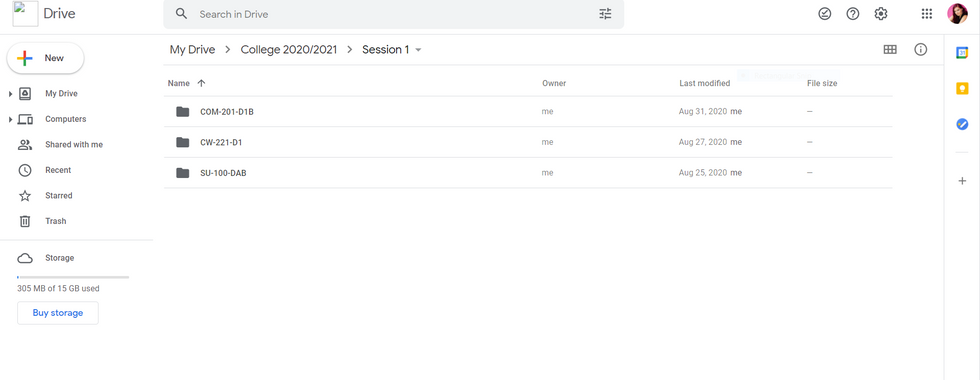
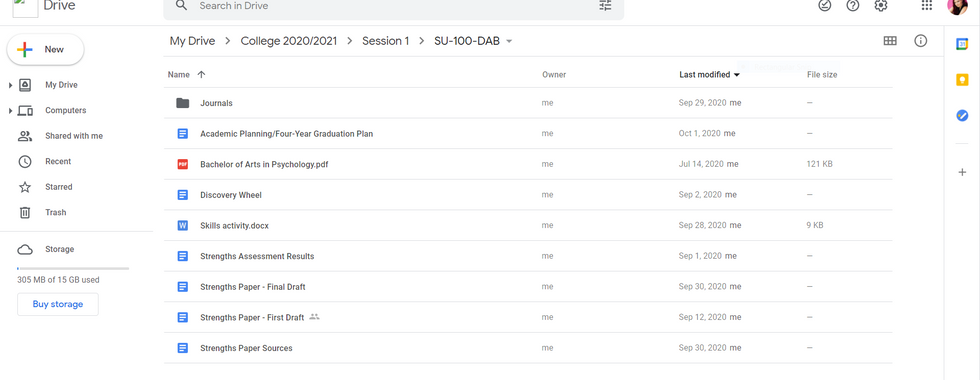
I use OneNote and Google Drive, mostly because I do all of my writing through Google Drive. If you use Google Drive or something similar, I recommend creating folders. I have subfolders of subfolders because it's easier to find information. I name everything appropriately. It really helps, I promise.



Preparing for the School Year
Great. You know what you can do and how you do it. Now, you need the items.
I recommend creating an Amazon wishlist specific to college. Look for things you want and need and add them to wishlist. Don't add them to your cart yet though. Do a little smart shopping. Look at other websites and stores for cheaper prices. That super cute binder you're only going to use for a semester might be cheaper at Wal-Mart. That pack of pens you saw at Target or Office Depot that's $20? It might be $10 or $15 at Wal-Mart, if that.
You're in college now. No matter how hard you try to avoid it, it's gonna burn a hole in your wallet. Be smart and pinch pennies where you can. The pastel Sharpies and glitter pens can wait. I use the Paper Mate InkJoy Gel Pens to keep my planner and handwritten notes color coded. They're currently $13.46 on Wal-Mart's website but it's possible you could find them elsewhere.
Also go shopping around back-to-school. As crazy as it's going to be, there are some great deals you can take advantage of.
For those of you living on campus or have a desk that you work at (especially if you have a lack of shelves), I recommend this desktop shelf. It comes in black, white, and a natural wood tone that matched my dorm room's desk. It's easy to put together and you can rearrange the pieces as you need. It gave me so much more room on my desk and helped me keep all of my textbooks and binders organized.
General Binder
I'm giving this it's own section. It's not necessarily academics, but it's still a lifesaver.
Colleges have a lot of students. Whether it's 2,200 or 22,000, that's a lot of paperwork to keep track of. Start printing out all of your paperwork as you get it. I made a binder for the 2020-2021 school year (and I'm in the process of putting together my 2021-2022 binder) that has all of my paperwork from my class schedule to my medical papers.
Create a section for each subject matter, for a lack of better words. Use sheet protectors to keep your papers organized.
I have sections for my Class Schedule, Medical Paperwork, Financials, Housing, Resident Assistant Paperwork, Work Study Paperwork, and Bowling Paperwork (I'm on my university's bowling team. Do whatever sport(s) you play for the school if you're an athlete).
My freshman year, the school lost my athletic medical paperwork. I would have been screwed if it weren't for the copies I had in my binder since I'm from out of state. I took my binder and I walked down to the athletic trainer's office and let him make copies of my paperwork to keep on file.
I have all of my contracts in there, like housing and work study. I even kept my financial statements from my institution as they were updated. I didn't throw out the old ones either, just in case. I kept them in chronological order.
It may take a little time to put this binder together, but it's worth it. It's also simple. It's something you can do while watching TV, listening to a podcast, an audiobook, or music. Get creative with it! For each section, I created a cover using Canva and Photoshop (Canva is completely free too!). There's a cover for the front of the binder and a matching spine label so I can find it easily amongst all of the other binders I have. It may seem like overkill but trust me when I tell you it may save you thousands of dollars or save your athletic season.





CONCLUSION
That's all that I have for now. I'm sure there's more that other people recommend that work for them, but it honestly just depends on the person. Below I've attached pictures my calendar, planner, and binder so you can see what it looks like. There's also a picture of my desk with the desktop shelf just in case you were considering it and wondering how much it can hold.
I wish you the best of luck in your academics!

Comments